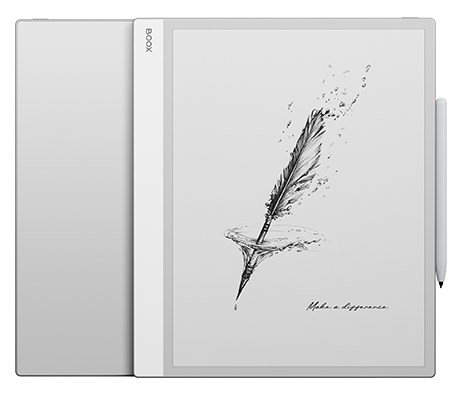

Your portal to a streamlined, digital workspace.
Vision-Friendly & Fast-Acting

RAM

ROM


The expansive, vibrant display provides a soothing viewing experience, without the harsh glare of conventional screens. Its soft, natural tones make browsing, reading, and multimedia tasks seamless and delightful.

Designed for Effortless Handling of Large Documents

for Crisp Text and Vivid Visuals

or a Natural Writing Experience

for Comfortable Day & Night Creativity
7nm Process Technology
Experience the advantages of technology without distractions from ads or endless scrolling.
Effortlessly brainstorm, review files, or convert quick sketches into polished shapes, highlights, and underlines using Smart Scribe tools. With a wide range of templates, brushes, and layers, your workflow feels seamless and natural.

Transform complex data into practical insights. Using color in data analysis enhances visualizations, making them more engaging, clearer, and easier to interpret.

Experience vivid colors and crisp details on a spacious display designed for every reader. With NeoReader built in, you can highlight, take notes, and customize themes to match your mood or task. Supporting multiple formats⁴, accessing your reading content is effortless.

It provides multimedia features that support diverse needs such as file organization and efficient note-taking. By merging text, visuals, and audio into a single digital file, it creates an immersive and engaging reading and writing experience.

With split-screen mode, you can review project plans while tracking progress, compare data sets side by side for deeper analysis, or read documents while taking notes. This multitasking feature streamlines workflow, saving time and enhancing productivity.
Cloud storage options such as Onyx Cloud, Google Drive, Dropbox, and OneDrive* provide effortless access across all your devices. With BOOXDrop⁵, transferring files between your Tab X C and other devices is quick and simple.
Manage tasks with ease using a simple, user-friendly home screen. The tablet-style interface allows you to customize widgets for instant access to key updates.
Develop your inspired ideas freely on Tab X C.

4096 Pressure Points with Tilt Recognition

Compatible with magnetic wireless charging

Interchangeable Stylus Tip

Features a haptic pressure sensor for realistic tactile feedback while writing.
Find the charging area on the side of your tablet.
Place the InkSpire Stylus so its center aligns with this spot.
Check the battery status—a notification will appear at the top of your screen confirming the stylus is charging.
Type fast. Work smarter. Turn your Tab X C into a high-performance productivity device with the stylish keyboard cover. Designed for modern professionals, it delivers a smooth, responsive typing experience, helping you stay efficient wherever you go.
The BOOX Tab X C is a premium 13.3-inch color E Ink tablet designed for professional productivity, document review, note-taking, reading, and multitasking. It features a Kaleido 3 color ePaper display, Android 13, Google Play Store support, BOOX Super Refresh Technology, 6GB RAM, and 128GB storage. Its near A4-sized screen provides a comfortable workspace for large documents, spreadsheets, presentations, research papers, and business workflows while maintaining the eye-friendly benefits of E Ink technology.
The BOOX Tab X C combines a large 13.3-inch color E Ink display with BOOX Super Refresh Technology, Android app support, and advanced productivity features. Unlike many E Ink devices that focus primarily on reading, the Tab X C is built for multitasking, document management, note-taking, and professional workflows. The color display also improves the readability of charts, diagrams, reports, presentations, and educational content.
Yes. The BOOX Tab X C supports the InkSpire Stylus and advanced handwriting features for note-taking, brainstorming, sketching, document markup, and project planning. With 4,096 pressure levels, tilt recognition, templates, layers, and Smart Scribe tools, it provides a natural writing experience that closely resembles paper while offering the advantages of digital organization and cloud synchronization.
For many professionals, students, researchers, and business users, yes. The Tab X C can replace notebooks, printed reports, study materials, contracts, and research papers. Users can write directly on documents, organize files digitally, sync notes to the cloud, and carry thousands of pages in a single lightweight device while maintaining a paper-like experience.
Yes. PDF reading and annotation are among the strongest use cases for the Tab X C. Its 13.3-inch display is nearly A4-sized, allowing users to view full-page documents with minimal zooming. Users can highlight text, write comments, review contracts, annotate research papers, and work with technical documents more comfortably than on smaller eReaders.
The Tab X C is specifically designed for professionals who work with large documents, spreadsheets, reports, presentations, contracts, technical drawings, and research materials. Features such as split-screen multitasking, cloud synchronization, Android applications, stylus support, and a large color display make it ideal for business, legal, consulting, engineering, and academic workflows.
Yes. The BOOX Tab X C includes built-in Google Play Store support, allowing users to install Kindle, Kobo, OneNote, Evernote, Google Drive, Dropbox, OneDrive, Microsoft Office applications, and many other Android apps. This flexibility allows users to customize the device for reading, writing, collaboration, and productivity.
For reading, note-taking, PDF review, research, document management, and focused work, the Tab X C can replace many tasks typically performed on an iPad. However, users who require video editing, gaming, graphic design, or intensive multimedia applications may still prefer a traditional tablet. The Tab X C is optimized for productivity and reduced distractions rather than entertainment.
Many users choose the Tab X C because its Kaleido 3 color E Ink display offers a paper-like viewing experience with less glare than traditional LCD or OLED screens. The adjustable two-tone front lighting and E Ink display technology are designed to support long reading and working sessions more comfortably.
The BOOX Tab X C offers a larger display, color E Ink technology, advanced multitasking, Google Play Store access, cloud synchronization, handwriting support, and BOOX Super Refresh Technology. It functions as a digital notebook, document workstation, research platform, and productivity device, making it one of the most capable large-format E Ink tablets available for professional use.


BOOX provides 10GB of free cloud storage for all users, old and new. Each Onyx account gets secure online space to store and sync notes.
** BOOX guarantees free firmware upgrades for every model for at least 3 years after launch, ensuring smoother performance and new features.
*** BOOX devices may help reduce eye fatigue, but effects vary. Remember to take regular breaks for healthier screen use.
[1] BOOX Super Refresh (BSR), launched in 2022, enhances refresh speed and image clarity with four distinct modes for smoother visuals and reduced ghosting.
[2] Dark Mode in NeoReader is available from firmware v3.5.3 onward, allowing easy switching between light and dark themes.
[3] E Ink ComfortGaze™ Lighting offers adjustable brightness and color temperature for day or night reading comfort.
[4] The USB-C port with OTG support lets users connect flash drives and other accessories directly.
[5] BOOXDrop enables fast two-way file transfers over LAN between BOOX, PCs, and mobile devices.
[6] The water-repellent design shields against everyday splashes, spills, and light rain. It is not waterproof and protection may lessen with time.
Images shown are for reference. Final product and firmware define actual features.
No products in the cart.